Short answer
Bitcoin solo mining, the whole block or nothing
In solo mining, a hit means the entire block jackpot of 3.125 BTC (≈ around €195,000) is yours alone, with no pool to share it with. A new draw every 10 minutes, live on the display, and real bitcoin knowledge picked up along the way, all for a few euros of electricity a year. Technically it runs through a solo pool such as public-pool.io and the stratum protocol, and the setup takes four steps. Honestly put: the chance is small but genuine. Every hash counts the same, you might hit in the first hour or never. That is the appeal: possibly the cheapest piece of real bitcoin lottery there is.
Solo mining is the original form of bitcoin mining: you mine alone, without joining a large pool, and on success you keep the entire block reward of 3.125 BTC. Sounds like winning the lottery? That is exactly how to see it, a real bitcoin lottery where a hit means the whole block is yours. This guide goes deep into the practice: how solo mining works technically, which pool URLs and stratum addresses you need, how to calculate your real odds, and which setup mistakes cost you hash rate without you noticing.
If you do not yet know what bitcoin mining is in general, read our bitcoin mining beginner's guide first. This article assumes you know the basics.
Solo against pool mining, the mathematical truth
In classic pool mining, thousands of miners join a shared pool. When a pool member finds a block, the reward is distributed among all members in proportion to the hash rate they contributed. The result: regular small payouts, low variance, predictable income.
In solo mining you try to find a block on your own. If it works, the whole reward is yours: no pool fees, no sharing. If it does not work, you get nothing. It is a pure all-or-nothing strategy.
| Criterion | Solo mining | Pool mining |
|---|---|---|
| Reward on success | 3.125 BTC in full (≈ around €195,000) | A share, by hash rate |
| Payout frequency | extremely rare, but maximal | regular, predictable |
| Pool fees | 0 % | 1–3 % |
| Statistical variance | extremely high (a lottery) | low (predictable) |
| Ideal for | hobbyists, learners, lottery players | professional mining operations |
| Risk profile | maximal, may pay out nothing for years | moderate, continuous cash flow |
The honest bottom line: solo mining makes mathematical sense in only two situations. First, if you own a massive hash rate (several petahash), where the wait for a block is measured in days rather than decades. Second, if the maths does not matter to you and you run solo mining as a hobby, a learning project or a deliberate lottery, at electricity costs under €3 a year.
How solo mining works technically
Even in "solo mining" your device usually connects to a server, a so-called solo pool. That sounds contradictory at first but has a technical reason: your miner constantly needs current block header information from the bitcoin network. Running your own full node would take around 700 GB of disk and continuous bandwidth. A solo pool takes that job off your hands.
The important difference to classic pools: with a solo pool you keep the entire reward when you find a block. The pool only passes mining jobs to you and takes nothing from the reward. Some solo pools charge a small service fee (0.5 to 2 %), others such as the well-known public-pool.io are completely free.
The main solo pools in 2026
-
public-pool.io — the best-known free solo pool. 0 % fee, run by the bitcoin community, perfect for hobby miners. Stratum URL:
stratum+tcp://public-pool.io:21496 -
solo.ckpool.org — the oldest public solo pool, founded in 2014. 2 % fee, but extremely stable. Stratum URL:
stratum+tcp://solo.ckpool.org:3333 - solomining.io — a commercial solo pool with extra statistics and a web dashboard. 1 % fee.
USB solo miners like the Nerdminer V2 come preconfigured for public-pool.io. You do not have to pick a pool at all; it works straight out of the box.
The stratum protocol, how your miner talks to the pool
Communication between miner and solo pool runs over the stratum protocol. Stratum has been the standard protocol for all bitcoin mining since 2012. How it goes:
-
Connect: your miner connects over TCP to the pool's stratum URL (
stratum+tcp://public-pool.io:21496, for instance). - Authenticate: the miner sends its worker name, which at a solo pool is the bitcoin address a potential block reward will be paid to.
- Receive a job: the pool continually sends the miner new mining jobs (block header data for the currently open blocks).
- Hash: for each job the miner tries to find a valid hash.
- Submit: when the miner finds a hash that meets the difficulty, it sends the solution to the pool, which verifies it and passes the block to the bitcoin network.
The good part: you need to know none of this to mine solo. Devices like the Nerdminer V2 handle the setup automatically. You enter your bitcoin address and the rest happens in the background.
The maths, how likely is a block find really?
Here it gets serious. Let us work out how often you would statistically find a block at various hash rates. Starting data (as of 2026):
- Bitcoin network hash rate: about 620 EH/s (620,000,000,000,000,000,000 H/s)
- Blocks per day: 144 (one every 10 minutes)
- Blocks per year: 52,560
The chance is small but real, and that is exactly the appeal. Here is the honest picture. It produces the following expected waiting times for various mining devices:
| Device | Hash rate | Share of the network | Expected time to 1 block |
|---|---|---|---|
| Nerdminer V2 | 250 KH/s | 4 × 10⁻¹⁶ | billions of years (a pure lottery ticket) |
| BitAxe Gamma | 1 TH/s | 1.6 × 10⁻⁹ | ~millennia |
| BitAxe Ultra (4 units) | 4 TH/s | 6.5 × 10⁻⁹ | ~millennia |
| Antminer S19 Pro | 110 TH/s | 1.8 × 10⁻⁷ | ~100 years |
| Antminer S21 | 200 TH/s | 3.2 × 10⁻⁷ | ~60 years |
How to read this: these are statistical expectations, not a schedule and not an expiry date. The average says nothing about when your block falls. In reality every single hash attempt is independent and the luck distribution is exponential, so the very first attempt is exactly as promising as the billionth: every hash counts the same. An expected time of "billions of years" for the Nerdminer V2 only means that averaged over enormous stretches a block rarely falls, not that it is impossible. It could be the first hour. It could be today.
And that is precisely the appeal: there are individual documented finds by hobby hardware in the GH/s to TH/s range. In March 2025 a tinkerer with a tiny Bitaxe at around 654 GH/s solved a complete block through solo.ckpool and collected 3.15 BTC, worth more than $200,000. Such hits are rare, but they really do happen, and every new block is a new draw. If you want a considerably bigger ticket without the tinkering, take the NerdNOS: a real BM1397 ASIC at ~100 GH/s, plug and play over USB-C with a display and a preconfigured pool, and therefore roughly 400,000× the hash rate of the Nerdminer V2. The NerdNOS plays in exactly the GH/s class where those surprise finds are documented. The Nerdminer V2 (250 KH/s) remains the smallest, cheapest lottery ticket for a few euros of electricity; the NerdNOS is the far bigger ticket for anyone who wants more to follow.
Setup, starting solo mining in 4 steps
-
Prepare a bitcoin wallet
You need a bitcoin address for a potential block reward to be paid to. Important:
- SegWit addresses (bc1q…) are the recommended choice: low transaction fees, broad compatibility.
- Legacy addresses (1… or 3…) work too but cost more when you later send from them.
- Taproot addresses (bc1p…) are not supported by many solo mining pools including public-pool.io. If you enter a Taproot address your miner runs, but a win would not be paid out.
For maximum security, hardware wallets such as the BitBox02 or a Ledger Nano are the way to go. Software wallets like Sparrow, Electrum or BlueWallet work as well.
No SegWit address yet?
No SegWit address (bc1q…) yet? Free in under 10 minutes at Finst (EU regulated). Taproot (bc1p…) does not work for solo mining.
Open a free account at Finst → -
Choose your solo mining hardware
Several classes of device currently make sense for hobby solo mining:
- USB mini miners (€40-80): devices like the Nerdminer V2 (ESP32, ~250 KH/s, under 1 watt). Very low hash rate, minimal power draw, purely a lottery and learning device.
- The plug-and-play NerdNOS ASIC (€99): a real BM1397 ASIC at ~100 GH/s over USB-C, with a display and a preconfigured pool, so roughly 400,000× the hash rate and therefore roughly a 400,000× bigger lottery ticket than the V2. Still entirely plug and play: no self-assembly, no firmware flashing. If you want a much bigger ticket without the tinkering, take the NerdNOS.
- BitAxe and open source miners (€150-250): higher hash rate (1 to 4 TH/s), firmware usually has to be flashed yourself, small fan.
- Used professional ASICs (€300-1,500): Antminer S9, S17 or S19. High hash rate, but loud, hot and power hungry, nothing for a living room.
A full overview with hash rate, power draw and price is in the USB bitcoin miner comparison 2026.
-
Set the device up
Setting up a USB solo miner usually takes 3 to 5 minutes:
- Connect the device to power over USB-C (a standard phone charger is enough).
- Connect to the device's temporary Wi-Fi network ("NerdMinerAP", for instance).
- In the configuration menu pick your home Wi-Fi and enter the password.
- Enter your bitcoin address.
- Set the pool URL if needed (preconfigured on many devices).
- Save; the device restarts and begins hashing.
An illustrated step-by-step guide with screenshots is in our Nerdminer V2 setup guide.
-
Check and optimise the hash rate
After starting, your solo miner's display shows the current hash rate. What to expect:
- Nerdminer V2 on firmware 1.8.3: 230-250 KH/s
- Nerdminer V2 on old firmware 1.6.x: 150-180 KH/s
- NerdNOS (BM1397): ~80-130 GH/s
- BitAxe Gamma: 0.9-1.1 TH/s
If your hash rate is well below expectations, the firmware is usually out of date. An update to the current version typically brings 30 to 40 % more performance with no hardware change. Instructions in the firmware update guide.
Common solo mining setup mistakes
- The wrong wallet address. Taproot addresses (bc1p…) do not work at most solo pools. Use SegWit (bc1q…).
- Pointing at 5 GHz Wi-Fi. USB solo miners support 2.4 GHz only. Enable a separate 2.4 GHz band in the router.
- Outdated firmware. On devices without a firmware update you lose up to 40 % of your hash rate. Always check for one.
-
The wrong stratum URL. If you use a custom pool, check the spelling and the port carefully (
stratum+tcp://public-pool.io:21496, for example). -
Forgetting the worker name. Some pools need a worker name (
BTC_ADDRESS.WorkerName); without it the miner runs but does not appear in the pool dashboard. - Not watching the pool dashboard. Some devices show "mining" even though the pool connection has actually dropped. Check regularly that your hash rate arrives in the solo pool dashboard.
When does solo mining pay off economically?
Think of it as a cheap lottery ticket plus a learning project: for a few euros of electricity a year you run your own small node alongside the bitcoin network, and on a hit the whole block is yours: 3.125 BTC, currently around €195,000. On a hobby device drawing under 1 watt at about €2.80 of electricity a year you can play for years at almost no loss and learn a lot about bitcoin along the way. Honestly put: solo mining is not meant as a source of return. The value lies in the lottery thrill, in the learning and in having a real piece of the bitcoin network running at home.
On larger setups (BitAxe and above) the electricity cost rises: 15+ watts means €40+ a year. If you are purely after predictable cash flow, pool mining is the calmer route, though there the "whole block or nothing" appeal disappears. The nicest compromise for the lottery kick is a GH/s device like the NerdNOS. It plays in exactly the class where genuine surprise finds are documented, while staying plug and play with a display: a much bigger ticket without the tinkering.
Common questions about solo mining
Do I need my own bitcoin full node for solo mining?
No, not in most cases. Solo pools like public-pool.io take on the job of supplying current block headers. If you want to do without a pool entirely you do have to run a full node, which means around 700 GB of storage, continuous bandwidth and more technical setup.
Can I run several solo miners in parallel?
Yes. You can run as many USB solo miners as you like on the same bitcoin address. Their hash rates add up mathematically and every unit improves your chance. On a win, the entire block reward goes to the miner that actually found the block.
What fee does public-pool.io charge?
Zero point zero per cent. public-pool.io is a free, community-run project. When a block is found the entire reward goes straight to the miner's bitcoin address.
How long does a solo miner need to run to make statistical sense?
For hobby devices under 1 watt: permanently. The electricity cost is so low that economically it makes no difference whether it runs or not. An Antminer S21, by contrast, should only run when the expected reward clearly exceeds the electricity cost.
What happens if I actually find a block?
The solo pool passes the block to the bitcoin network. Once other miners confirm it (typically after 6 confirmations, so about an hour later), the entire block reward of 3.125 BTC plus transaction fees appears in your wallet. You do not become automatically rich, though: you still have to pay tax on the receipt.
Read on, related depth
Your own bitcoin lottery ticket
Solo mining means the whole block or nothing. With the Nerdminer V2 you play for a few euros of electricity a year; with the NerdNOS you play in the GH/s class where genuine surprise finds are documented.
Buy the Nerdminer V2 → Buy the NerdNOS → Plug & play · preconfigured solo pool · ships from Germany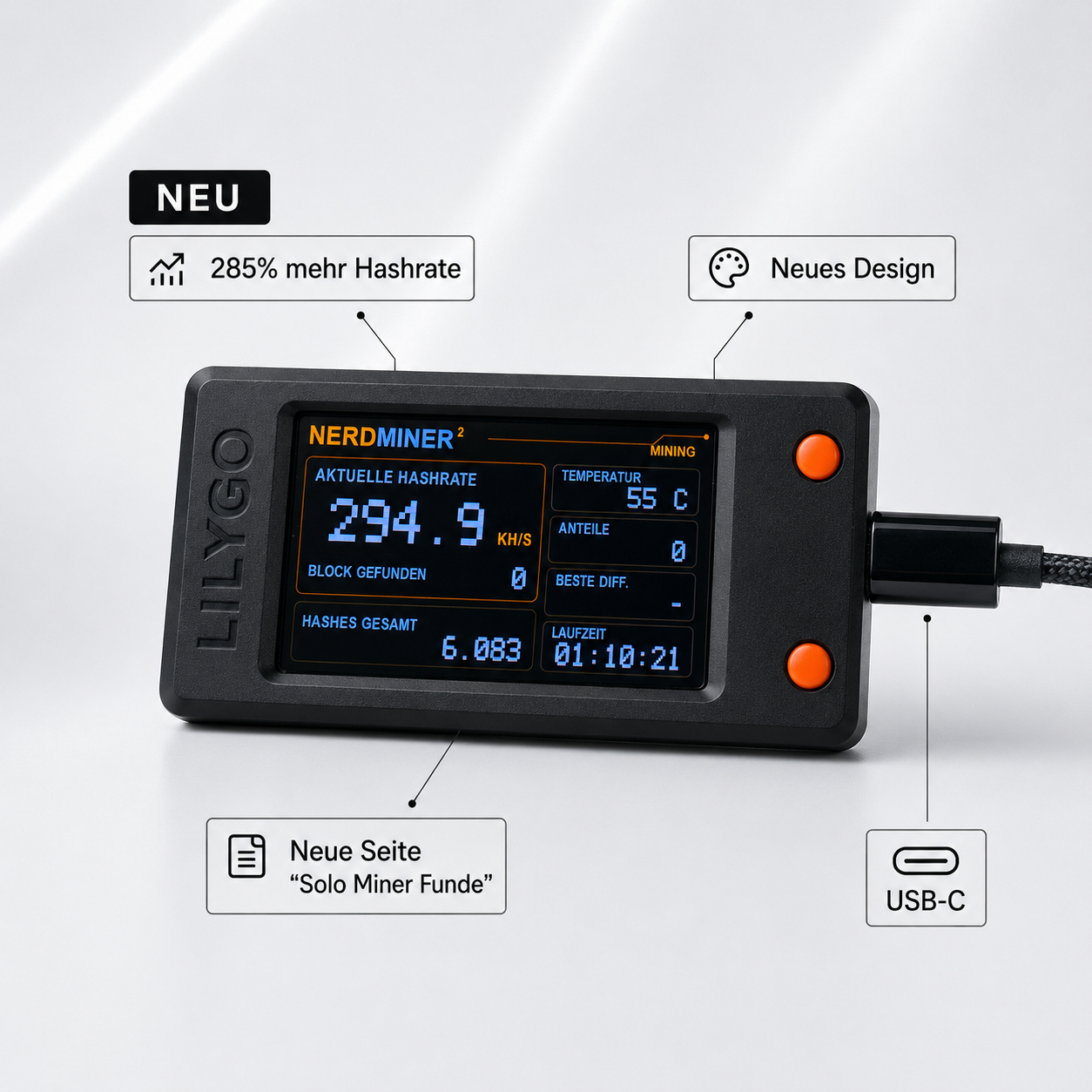


Share: