Change Nerdminer V2 Pool 2026 — Configure Custom Stratum and Switch Solo Pool
The Nerdminer V2 is factory-configured to public-pool.io — the most well-known solo pool in the Bitcoin community. For most users, this is the optimal choice: free, 0% fee, solo-optimized. But there are situations where you might want to change the pool: a second solo pool as a backup, custom stratum for private pools, a classic mining pool for statistically better returns with larger setups, or simply switching to an alternative pool like solo.ckpool.org. This article shows you step-by-step how to change the pool on your Nerdminer V2 — no matter which firmware version you are using.
Why change the pool at all?
The standard configuration public-pool.io is perfect for 95% of Nerdminer users. Nevertheless, there are good reasons to consider a change:
- Backup pool for uptime. If public-pool.io experiences downtime, your Nerdminer loses hashing time. A backup pool as a fallback keeps you online.
- Private solo pool or your own node. Advanced users operate their own Bitcoin Full Node with a Solo Mining interface and want to exclusively send to it.
- Alternative solo pools. solo.ckpool.org or solomining.io offer similar services to public-pool.io, sometimes with different statistics dashboards.
- Classic mining pool for higher hashrate. If you operate several Nerdminers in parallel or have an additional BitAxe, a classic pool with regular small payouts can be more sensible.
- Paid pools with additional features. Some commercial pools offer notifications, detailed analytics, or multi-pool routing.
The 3 methods to change the pool
Depending on how far along you are in the setup and which firmware version you are using, there are three ways to configure the pool:
- Method 1: Via the configuration web interface during initial setup (easiest method)
- Method 2: Via the IP address of the running Nerdminer (for already configured devices)
- Method 3: Through a complete factory reset and reconfiguration (emergency method)
Method 1: Change pool during initial setup
eToro risk warning: Your capital is at risk. Crypto assets are highly volatile, other fees and taxes may apply.
The easiest way to make the change is during the very first setup of the Nerdminer V2. After switching it on, the device opens an Access Point called "NerdMinerAP" or "NerdMiner_AP". Connect to it with a smartphone or laptop.
-
Open browser and navigate to
192.168.4.1. The configuration menu will appear. - Select your home Wi-Fi from the list and enter the Wi-Fi password.
- Enter Bitcoin address (SegWit recommended, starting with bc1q...).
-
Expand Advanced settings, if available. There you will find:
-
Pool URL:Default ispublic-pool.io -
Pool Port:Default is21496 -
Pool Password:Default isx(placeholder, usually not relevant)
-
-
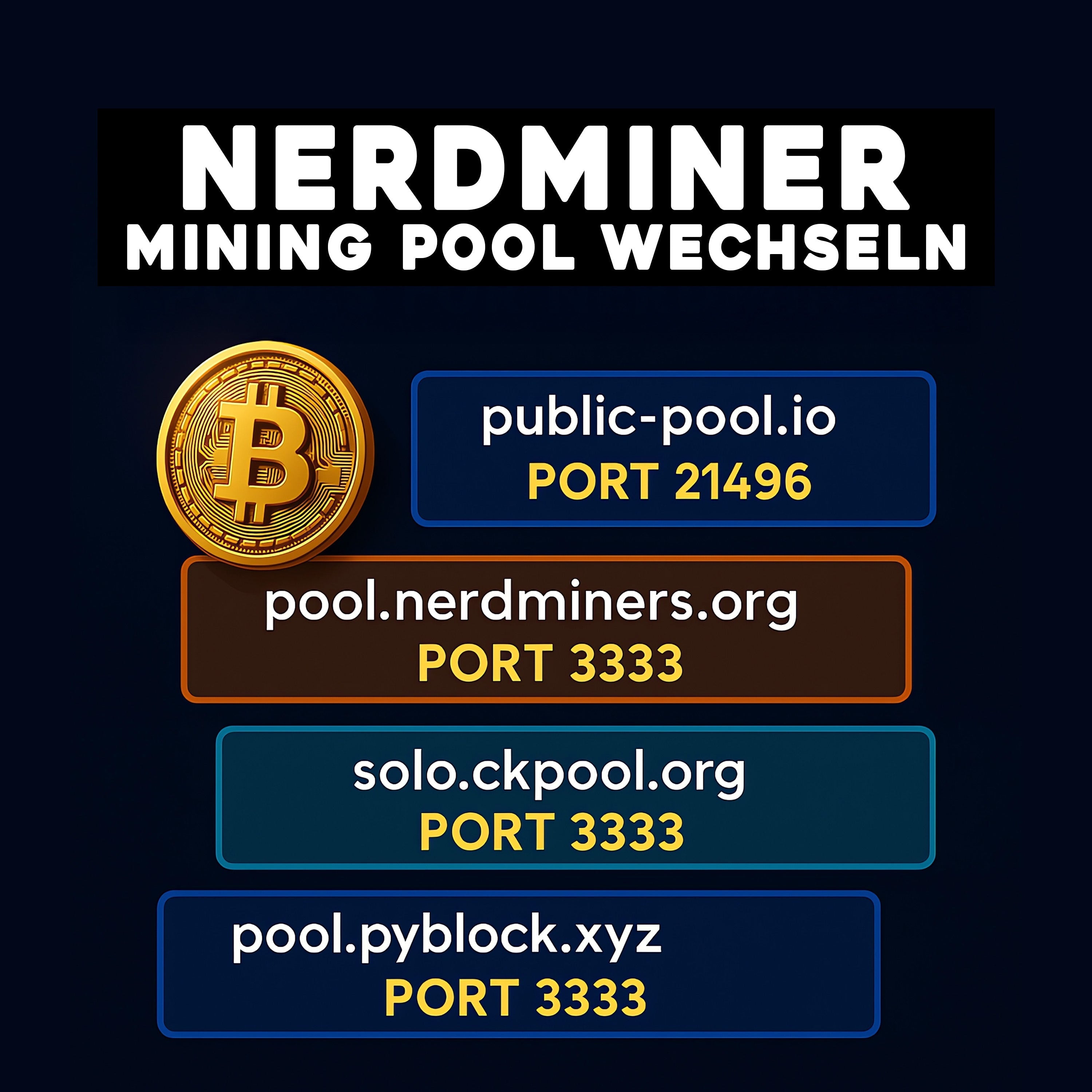
Enter your desired pool URL. Examples:
- solo.ckpool.org (Port 3333)
- solomining.io (Port 7777)
- Your own Bitcoin node IP (e.g., 192.168.1.100 Port 3333)
- Save and Restart. The Nerdminer will connect to the new pool within 1-2 minutes.
Method 2: Change pool after setup (on a running device)
If your Nerdminer is already running and you want to change the pool afterwards, you will need the IP address of the device in your home network. You can find this in three places:
- On the Nerdminer's OLED display (some firmware versions show the IP on the status screen)
- In your router's admin interface under "Connected Devices" (look for "NerdMiner" or MAC address)
- With a network scanner like Fing (iOS/Android) or Angry IP Scanner (Windows/Mac/Linux)
Once you have the IP (Example: 192.168.1.42):
-
Open browser and enter the IP (e.g.,
http://192.168.1.42). - The Nerdminer's web dashboard will appear. Here you will find live statistics, version info, and configuration options.
- In the "Configuration" or "Settings" menu, change the pool URL.
- Save — the Nerdminer usually restarts automatically and connects to the new pool.
Note: Not all Nerdminer V2 firmware versions offer a web dashboard during operation. Older versions (before 1.7.x) can only be configured via Method 1 or 3.
Method 3: Factory reset and reconfiguration
If you cannot find the IP address, the web dashboard is not accessible, or something went wrong, you can reset the Nerdminer to factory settings:
- For some firmware versions, it is enough to select "Reset Config" in the Nerdminer menu (if available).
- Alternatively: Disconnect USB cable, hold down the Boot button on the board, reconnect USB. The device starts in setup mode.
- Connect to the "NerdMinerAP" access point.
- Completely reconfigure as described in Method 1.
- Enter the desired pool directly during initial setup.
The most popular Solo Pools 2026 for the Nerdminer V2
| Pool Name | Stratum URL | Port | Fee | Special Features |
|---|---|---|---|---|
| public-pool.io | public-pool.io | 21496 | 0 % | Standard, community-run, solo-optimized |
| solo.ckpool.org | solo.ckpool.org | 3333 | 2 % | Oldest Solo Pool, since 2014 |
| solomining.io | solomining.io | 7777 | 1 % | Web dashboard, statistics |
| Own Node (Public-Pool) | Your-Node-IP | 3333 or 21496 | 0 % | Maximally decentralized, requires own Bitcoin node |
Can I set up a classic pool (not Solo) on the Nerdminer?
Technically yes — you can enter any Stratum URL, including that of a classic pool like Foundry, F2Pool, or Antpool. Practically, this makes no sense for a Nerdminer V2. With a hashrate of 250 KH/s, the proportional pool rewards are so tiny (in the range of 10⁻¹⁵ BTC per day) that they will never reach the minimum payout limit and will never be paid out. Solo pools like public-pool.io are the only sensible configuration for mini-hashrate devices.
Details on the mathematical decision: Solo Mining vs. Pool Mining.
Verify pool change
After changing the pool, you should check if the change was successful:
- On the OLED display, check if the pool name or pool URL is displayed. Many firmware versions show the pool on the status screen.
-
In the web dashboard of the new pool (e.g.,
public-pool.io/app/miner/YOUR_BITCOIN_ADDRESS), check if your hashrate is arriving there. - Hashrate comparison: The hashrate should be visible on the new pool within 2-3 minutes after the change and should roughly match the old value (230-250 KH/s).
Typical problems when changing pools
Problem: After changing, display shows "0 KH/s" or "disconnected"
Most common cause: Incorrect pool URL or incorrect port. Check the spelling — public-pool.io (not publicpool.io), Port 21496 (not 21494 or similar).
Problem: Hashrate on the new pool is lower than expected
Some pools have a longer warm-up time for the initial statistics (5-15 minutes). Wait at least 30 minutes before comparing the displayed hashrate with the display.
Problem: Nerdminer finds Wi-Fi, but no pool connection
Firewall blocking. Many public Wi-Fi networks or company home networks block Stratum ports (3333, 21496). Test in another network or open the port in your router configuration.
Problem: After changing, it mines two pools simultaneously
This is not possible — the Nerdminer V2 only supports one pool at a time. If the display seems misleading, it is due to outdated statistics. After a few minutes, the display will normalize.
Frequently asked questions about changing the pool on Nerdminer V2
Do I lose accumulated shares if I change the pool?
Shares are exchanged live between the Nerdminer and the pool and are not stored on the device. A pool change does not lose any stored data, but the previous pool history is tied to the old pool and remains viewable there.
Can I configure multiple pools with failover on the Nerdminer V2?
No, the current firmware (1.8.3) only supports one pool at a time. Multi-pool failover is under discussion for a possible future version but is not yet implemented.
What is the pool URL for public-pool.io?
public-pool.io on Port 21496 (Stratum). The web dashboard URL is https://public-pool.io/app/miner/YOUR_BITCOIN_ADDRESS.
How often should I change the pool?
Practically never for a Nerdminer V2. The default public-pool.io is the optimal choice for mini-hashrate devices. Changes are only worthwhile for specific reasons (outage, experimentation, own node).
What are the fees for Solo Pools?
public-pool.io: 0%. solo.ckpool.org: 2%. solomining.io: 1%. Most solo pools are economically irrelevant for mini-hashrate devices because there are no regular payouts anyway — the fee only applies to found blocks.
Further Reading
- Complete setup guide with screenshots
- Bitcoin Solo Mining Practical Guide
- Solo Mining vs. Pool Mining — the mathematical decision
- Firmware Update for more hashrate
- Wi-Fi Troubleshooting for connection issues
Don't have a Nerdminer yet?
Order Nerdminer V2 — pre-configured for Public-Pool
To the Nerdminer V2 in the shop →eToro risk warning (advertising): eToro is a multi-asset platform which offers both investing in stocks and trading CFDs. CFDs are complex instruments and come with a high risk of losing money rapidly due to leverage. 50% of retail investor accounts lose money when trading CFDs with this provider. You should consider whether you understand how CFDs work and whether you can afford to take the high risk of losing your money. Crypto investments are high risk and highly volatile. Crypto trading at eToro (Europe) Ltd. is provided by DLT Finance, crypto custody by Tangany. Taxes may apply. Your capital is at risk. We earn a commission on accounts opened through the eToro links on this page.



Teilen: